Quick Tips
- Help the worm get to the bottom by making words before the dynamite explodes!
- Choose letters to make your word — they do NOT have to be next to each other.
- Valid words turn green in the word bar. Tap the bar to submit.
- Invalid words appear red. Tap the red bar to clear and start over.
- The more points you get, the more stars you'll earn.
- Watch the wick on the right side — it's game over if it reaches the bottom before the worm.
- 3 letter words are limited. Watch the dots on the bottom dashboard.
- Use all the gem tiles in every level to unlock secret levels!
- Drag bombs onto letters if you need help clearing the way.
- Earn more bombs by using bomb tiles in a word.
- Proper nouns (names of people, places, etc.) are not valid game words.
The Basics
Objective
The objective in Word Wow is to clear a path for the worm to reach the bottom of the screen. As you make
words, the letter blocks disappear, creating an open path for Worm.
How to make words
Just start tapping letters! You can choose any letter on the screen — they do not need to be next to each
other. If you can see the letter, you can use it. The Word Wow dictionary is based on the Scrabble
dictionary: words that are hyphenated, capitalized (proper nouns including names and places), or
apostrophized are not allowed.
Your letters appear on the submit bar on the bottom dashboard. Incomplete and invalid words appear red —
tap the bar to clear them. Valid words appear green — tap the bar to submit.
💡In French, all accents have been removed for ease of
play.
The wick
The wick is your timer. You'll find it on the right side of the play screen; it ignites when you start the
level. If the wick reaches the ground before the worm, it's game over. Beat the wick to the bottom and you
win!
Gems & Stars
Gems
Each level has hidden gems! There is at least one gem FRAGMENT in each level, and you need to collect all
the fragments on a level to earn the full GEM. Find and use the gem fragment tiles in a word to collect
them. When you earn a gem fragment, you still have to complete the level to keep it — if you fail, the
fragment will be available again next time you play the level.
Collect all gems, on all levels, in any given world to unlock secret bonus levels!
Stars
You can earn up to 3 stars on each level. Stars are optional and not required to advance.
Earn stars by making longer words with rare letters (Q, X, Z, etc.) or by making words in rapid
succession. Keep making words quickly and you can push the multiplier up to 10X — a really fast way of
earning star points! See the Scoring section for details.
Boosters & Special Tiles
Bombs
Booster bombs blast away letters to help clear a path for the worm. They live on the bottom right of the
dashboard — drag a bomb onto the screen and release it on top of the letters you'd like to destroy. You
start the game with a few bombs, and using a bomb tile in a word (look for the small black bomb in the tile
corner) adds one to your inventory. You can also purchase more from the pause menu.
Shuffles
Want a fresh set of letters? Drag a shuffle onto the tiles and release. This exchanges all visible letter
tiles for new ones (tiles with vines won't be shuffled).
Shuffle tile
Using these tiles in a word adds one shuffle to your inventory, ready whenever you need it.
3 letter words
You can only make a limited number of 3 letter words on each level, shown as dots on your bottom
dashboard. Each dot allows one 3 letter word. Run out, and the game will only accept longer words for the
rest of that level.
Note: 3 letter word allowances are assigned per level and do NOT carry forward.
Vine obstacle
Some tiles have a cage or vines on top. You must use these tiles twice to remove them from the board.
Scoring
Scoring is based on the letters used and the length of the word. Words longer than 9 letters earn a bonus
5,000 points for each letter over 9 — a 15 letter word is worth 30,000 bonus points, awarded at the end of
the level.
| Points |
Letters |
| 1 | A, E, I, O, U, L, N, R, S, T |
| 2 | D, G |
| 3 | B, C, M, P |
| 4 | F, H, W, Y, V |
| 5 | K |
| 8 | J, X |
| 10 | Q, Z |
Words longer than 3 letters earn a multiplier:
| Word length |
Multiplier |
| 4 letter words | 2x |
| 5 letter words | 3x |
| 6 letter words | 4x |
| 15 letter words | 13x, and so on |
Bonus levels
There are bonus levels at the end of each world. After collecting all gems in a world, a bonus level
becomes available on the level screen. Click to open it and get ready for a challenge!
Difficulty settings
There are 3 difficulty settings; the default is "normal". Change it from the options button on the main
screen.
- Easy — more 3 letter words allowed, fewer points required for 3 stars
- Hard — 15% scoring bonus, fewer 3 letter words, more points required for 3 stars
Challenges & Rankings
Rankings
Word Wow tracks your ranking among all players around the world (Apple, Google Play, Amazon and Mac OSX).
Your level ranking appears on the level complete screen; your overall "whole game" ranking — the sum of
your scores from all levels — is shown on the world selection screen.
Tip: completing the bonus levels will greatly increase your ranking!
Leaderboard
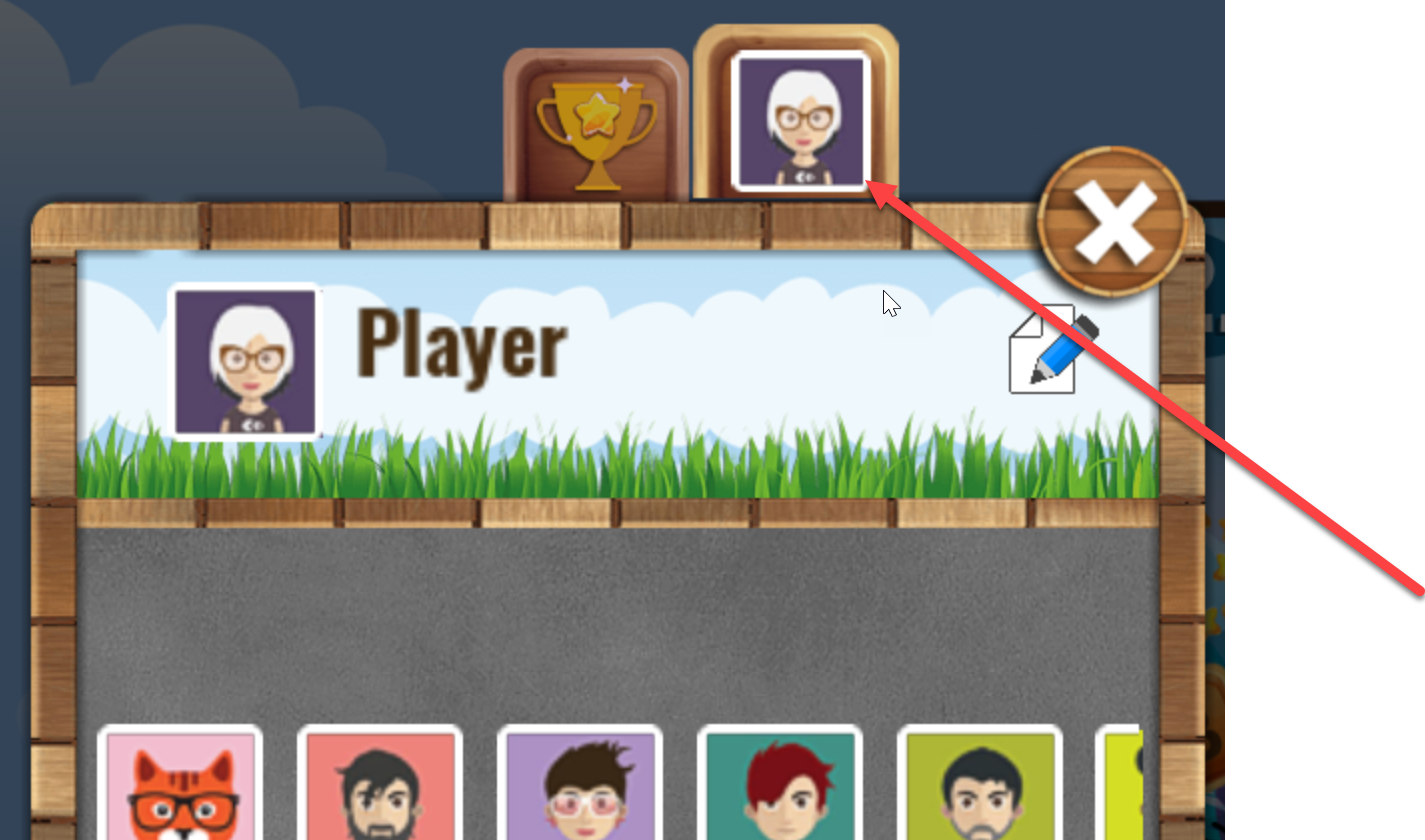
See your total score from the world selection screen by tapping the scoreboard at the top. The level
leaderboard is displayed after completing a level (from level 5 on). Set your nickname and avatar from the
right-most tab at the top of the leaderboard — this applies to the Daily Drop leaderboard too.
Daily Drop Challenge
Every day (starting around 8am EST) the Daily Drop begins and you have 24 hours to complete 3 levels. The
rules are a little different: find the 3 target words displayed along the top of the screen AND get the
worm to the bottom — within a limited number of moves rather than a timer. Complete all the levels to earn
a reward and a place on the challenge leaderboard.
Struggling with the target words? You can watch a video to advance to the next level, as long as you
reached the bottom within the required moves.
The Daily Drop button appears on the title screen after completing level 1 of the first
world.
Achievements
From level 10 you'll have access to Achievements via the egg icon on the world and level selection
screens. Each reward egg has a challenge attached — tap an egg to see it, then complete the challenge to
earn the egg. Earn all the eggs in a group for a reward.
Account & Support
Playing with friends
On the opening screen you'll find a "Save Progress" button with a Facebook login. Link up with your
friends and compete for the best score. We do not collect or use any of your Facebook information, nor do
we have access to post on your wall.
Purchases
Remove Ads: this in-app purchase removes all ads from the game.
Bombs and Shuffles: you may purchase additional bombs or shuffles at any time, with
discounts on volume bundles. Purchased items never disappear until you use them — closing the game won't
lose anything you've bought.
Playing on multiple devices
To play Word Wow on more than one device (or a new device), use the "Save your Progress" button on the
title screen to log in with Google, Facebook or Amazon (Amazon on Android only). Your progress becomes
available on any device where you log in the same way.
We do not store your login or passwords — this is a completely secure way of preserving your
game data.
Feedback
We love hearing from you! The best way is through the app: main screen → options (gear icon) → leave
feedback. That tells us which version you're playing so we can help faster. You can also use our
contact page or email [email protected].
Enjoying the game?
Please rate our app! Great ratings mean more players, which lets us create more levels and new games. Find
the rate link under options on the main screen, or rate directly in the App Store, Google Play or
Amazon.