Quick Tips
- Help the worm get to the bottom by making words and clearing a path!
- Letters do NOT have to be next to each other.
- Valid words turn green in the word bar. Tap the bar to submit.
- Invalid words appear red. Tap the red bar to clear and start over.
- Watch the wick on the right side — it's game over if it reaches the bottom before the worm.
- 3 letter words are limited. Watch the dots on the bottom dashboard.
- Use all the gem tiles in every level to unlock secret levels!
- Drag bombs onto letters if you need help clearing the way.
- Drag a potion bottle onto the board to shuffle the tiles and get all new letters.
- Turn the timer off or change the difficulty under Options on the Title screen.
- Proper nouns (names of people, places, etc.) are not valid game words.
The Basics
Objective
Clear a path for the worm to reach the bottom of the screen. As you make words, the letter blocks
disappear, creating an open path for Worm.
How to make words
Just start tapping letters! You can choose any letter on the screen — they do not need to be next to each
other. If you can see the letter, you can use it. The Word Wow dictionary is based on the Scrabble
dictionary: words that are hyphenated, capitalized (proper nouns including names and places), or
apostrophized are not allowed.
Your letters appear on the submit bar on the bottom dashboard. Incomplete and invalid words appear red —
tap the bar to clear them. Valid words appear green — tap the bar to submit.
💡In French and Spanish, all accents have been removed
for ease of play.
The wick
The wick is your timer. You'll find it on the right side of the play screen; it ignites when you start the
level. If the wick reaches the ground before the worm, it's game over. Beat the wick to the bottom and you
win!
⏱️You can turn the wick off and play without any time
pressure — go to Options from the Title screen.
Stars & Gems
Stars
You can earn up to 3 stars on each level. Stars are freed by using a star tile in a word. Once a star is
free, collect it by guiding the worm to it. Stars behave like tiles — if you remove tiles below a star it
will fall, and sometimes you'll need to do this to bring the star down to the worm.
Gems
Around the World has at least one gem tile in each level. Collect all gem tiles on a level to earn the
full gem — you can watch it fill up on the top dashboard. Use the gem tiles in valid words to collect them,
and complete the level to keep them. If you fail, the gem tiles will be available again next time you
play.
Collect all gems, on all levels, in any given country to unlock the three bonus levels!
Boosters & Special Tiles
Bombs
Booster bombs blast away letters to help clear a path for the worm. If you need some help, drag a bomb
onto the screen and release it on top of the letters you'd like to destroy. You start the game with a few
bombs and can earn more by using a bomb tile in a word. You can also purchase more from the pause
screen.
Shuffle potion
The shuffle potion gives you a fresh set of letter tiles. Shuffles appear on the bottom dashboard — drag a
potion onto the screen and release it. You can randomly win more shuffles by using the gift tile in a word,
or purchase more from the pause screen.
3 letter words
You can only make a limited number of 3 letter words on each level, shown as dots on your bottom
dashboard. Each dot allows one 3 letter word. Run out, and you'll have to make longer words to finish that
level.
Gift tile
Use a gift tile in a valid word to receive bonuses including 3 letter words, keys, shuffles, additional
time and bonus points!
Keys
Collect keys by using a gift tile in a valid word. Collect as many as you can before completing the level
to access a luggage rack where you can use your luck to find free boosters!
Worm holes
Some levels have worm holes which take you to another part of the board. Some levels have more than one
path downward — keep falling, or guide the worm into a worm hole to reach a new section which MAY contain
gems or other bonus tiles. If you can't complete a gem on a level, look for a worm hole you haven't taken:
the missing gem parts are likely in that untravelled section.
Scoring
Scoring is based on the letters used and the length of the word. Words longer than 9 letters earn a bonus
5,000 points for each letter over 9 — a 15 letter word is worth 30,000 bonus points, awarded at the end of
the level.
| Points |
Letters |
| 1 | A, E, I, O, U, L, N, R, S, T |
| 2 | D, G |
| 3 | B, C, M, P |
| 4 | F, H, W, Y, V |
| 5 | K |
| 8 | J, X |
| 10 | Q, Z |
Words longer than 3 letters earn a multiplier:
| Word length |
Multiplier |
| 4 letter words | 2x |
| 5 letter words | 3x |
| 6 letter words | 4x |
| 15 letter words | 13x, and so on |
Bonus levels
There are bonus levels at the end of each country. After collecting all the gems, 3 bonus levels become
available on the level screen. Click to open one and get ready for a challenge!
Difficulty settings
There are 3 difficulty settings; the default is "normal". Change it from the options button on the main
screen.
- Easy — 35% more time per level, 4 additional three letter words allowed
- Hard — 20% more points for the entire level, 4 fewer three letter words, 10% less
time
Challenges & Rankings
Rankings
Around the World tracks your ranking among all players worldwide (Apple, Google Play, Amazon and Mac OSX).
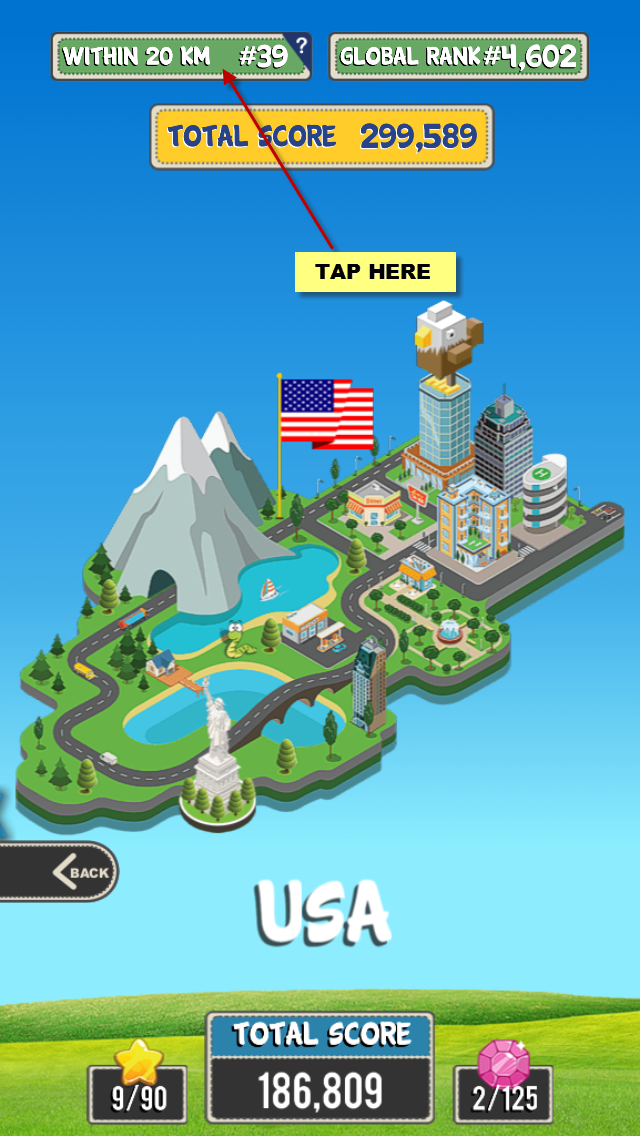
Your level ranking appears on the level complete screen; your overall "whole game" ranking — the sum of
your scores from all levels — is shown on the world selection screen.
Tip: completing the bonus levels will greatly increase your ranking!
Local ranking
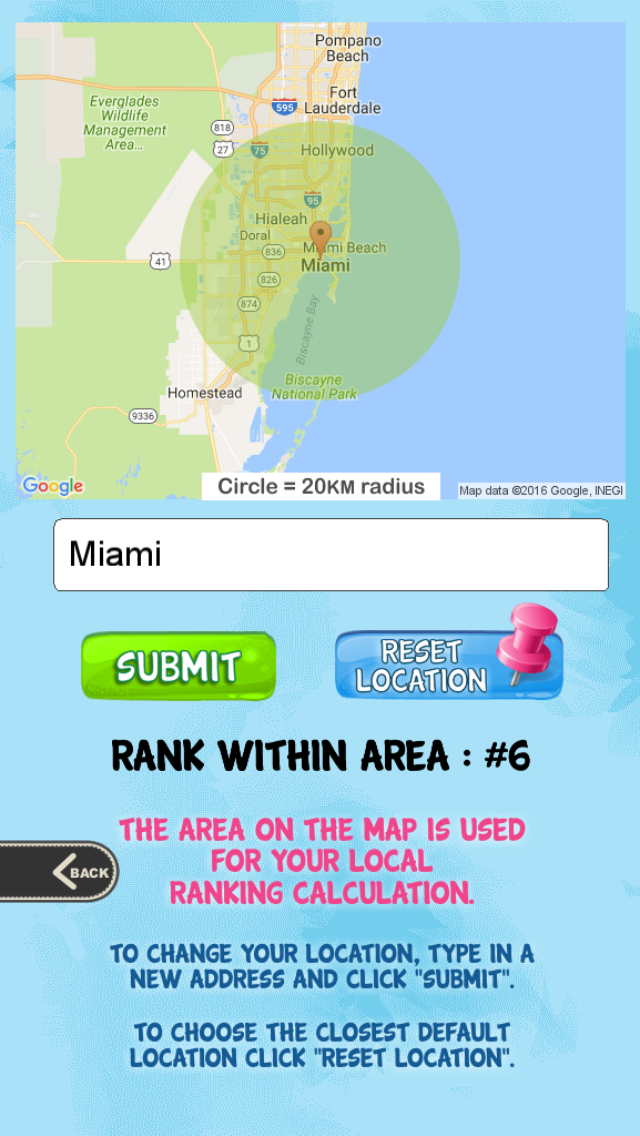
Around the World also has a Local Ranking — your rank among all players within a 20 km radius. Being #9 in
all of London is a lot more inspiring than #35,342 worldwide! On the Country selection screen, tap the
Local Ranking label at the top to fine-tune your location or see how you'd rank in places around the
world.
Day Trip Challenge
Every day (starting at 12 noon EST) the Day Trip Challenge begins and you have 24 hours to complete 4
levels. Find the 3 target words displayed along the top of the screen AND get the worm to the bottom —
within a limited number of moves rather than a timer. Complete all the levels to earn a reward and a place
on the challenge leaderboard.
Account & Support
Playing with friends
On the opening screen you'll find a connect to Facebook button. Log in to play against your friends and
see who dominates! We do not collect or use any of your personal Facebook information, and we cannot post
to your wall without your consent.
Purchases
Remove Ads: this in-app purchase removes all ads from the game.
Bombs and Shuffles: you may purchase additional bombs or shuffle potions at any time,
with discounts on volume bundles. Purchased items never disappear until you use them.
Playing on multiple devices
To play Around the World on more than one device (or a new device), use the "Save your Progress" button on
the title screen to log in with Google, Facebook or Amazon (Amazon on Android only). Your progress becomes
available on any device where you log in the same way.
We do not store your login or passwords — this is a completely secure way of preserving your
game data.
Feedback
We love hearing from you! The best way is through the app: main screen → options (gear icon) → leave
feedback. That tells us which version you're playing so we can help faster. You can also use our
contact page or email [email protected].
Enjoying the game?
Please rate our app! Great ratings mean more players, which lets us create more levels and new games. Find
the rate link under options on the main screen, or rate directly in the App Store, Google Play or
Amazon.